Feed
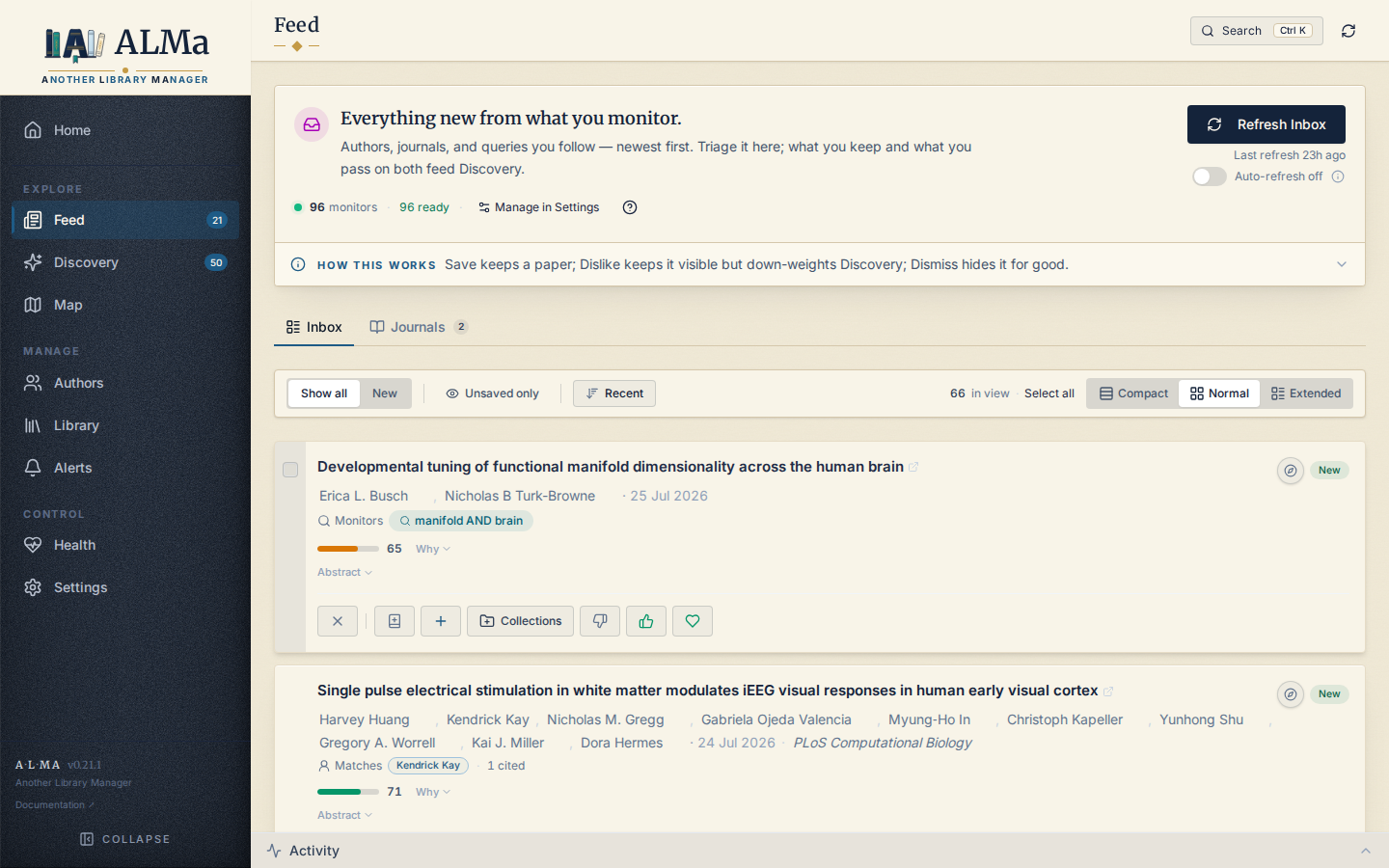
The Feed is your chronological inbox. It surfaces papers you haven't seen yet from sources you've explicitly told ALMa to watch. Unlike Discovery (which is probabilistic and ranks by relevance), the Feed is deterministic and orders strictly by time.
What populates the Feed
A feed_items row is created when one of your monitors finds a
paper that's new to ALMa. The monitor types:
| Monitor | Source |
|---|---|
| Author monitor | A followed author publishes a new work (OpenAlex). |
| Topic monitor | OpenAlex returns a new work matching a topic / concept query. |
| Query monitor | A free-text query against OpenAlex search returns a new work. |
| Journal monitor | A new work is published in a followed journal — matched by exact OpenAlex source id (see below), not a name search. |
Journal monitors are noisy by nature (a busy venue publishes constantly), so they live on their own Feed surface — the Journals tab — instead of mixing into the author/topic/keyword Inbox. See Journal (venue) monitors.
Monitors run on a schedule (default: every few hours) via the APScheduler background loop. You can also trigger them manually from Settings → Discovery weights → Feed monitor defaults or from the per-author "Refresh now" action.
Monitor health
The Feed status strip surfaces a "{N} degraded" count when one or
more monitors are unhealthy. Hovering it opens a tooltip that lists
each degraded monitor by label, with its health_reason (or
last_error) when available — capped at 8 entries, with a
"+N more — see Settings" line when there are more. The values come from
the monitor's health / health_reason / last_error fields, so the
strip is a quick read on which sources are failing without leaving the
Feed.
Window and ordering
The Feed is bounded to roughly the last 60 days by publication date. Older items aren't deleted — they remain queryable from Library (if saved), Discovery (as candidates), and the Corpus Explorer (everything) — but they fall out of the Feed view to keep the inbox fresh.
When publication_date is missing, ALMa falls back to
fetched_at (when the monitor first saw the paper) so items still
order correctly. There is no YYYY-01-01 fabrication for missing
dates.
Hiding what you've already dealt with
Unsaved only (in the control bar) hides papers already saved to your Library or sitting on your reading list. It's off by default: Feed is a chronological record of what your monitors found, and hiding what you kept would make that record dishonest. Turn it on when you want the inbox to show only what still needs a decision. The choice persists.
Reading-list papers count as dealt-with — you've committed to them, so they aren't awaiting a decision either.
Landing view and New markers
Feed opens on Show all: the complete chronological 60-day record is the default, while New is an optional time/fetch lens.
A paper is New when any monitor fetched it:
- during the latest completed Feed refresh, or
- during the rolling last 24 hours.
These windows are a union. The latest refresh remains represented even when it is more than 24 hours old, while papers from other manual or scheduled runs in the last day are included too.
The check is per-paper, not per-row. A paper credited to multiple monitors
may have several feed_items rows; if any row matches either window, its single
Feed card is New. Save, Like, Love, Dislike, or adding the paper to the reading
list does not change this factual recency marker. Only Dismiss hides it.
The New filter, card and journal-group pills, status endpoint, and sidebar badge all use that same predicate, so their paper counts cannot drift. Opening Feed does not clear New; papers age out naturally when they are no longer in the latest refresh and exceed 24 hours.
POST /feed/seen remains an owner-review stamp for Home's older carryover
summary. It does not control Feed's New markers.
Journal (venue) monitors
Following a journal is a first-class monitor, but its matching and its surface differ from the others. This section is the contract.
What "follow a journal" does
Following a journal (from a paper card's venue name, the Journals tab, or
Settings) creates one enabled feed_monitors row with
monitor_type = 'venue'. It is keyed by the journal's OpenAlex source id
(monitor_key = the lowercased S… id — unique and rename-proof), and its
config_json carries { "query": "<display name>", "source_id": "S…",
"filter_keywords": [...] }. Following does not fetch anything on its own —
it only registers the source. Papers arrive on the next Feed refresh
(manual Refresh Inbox, or the scheduled auto-refresh when enabled).
Resolution to a source id is deliberate: the follow UI searches OpenAlex
/sources and you pick the exact journal, so "Cortex" follows the journal
Cortex — never every paper whose text mentions the word.
Where the items come from
On refresh, a venue monitor bypasses the free-text cross-source fan-out and fetches directly from OpenAlex:
That is an exact membership query — every returned work was actually
published in that source. Results are upserted into papers and each match
gets a feed_items row with monitor_type = 'venue'. No other source
(Crossref, S2, arXiv, bioRxiv) participates for a venue monitor.
An optional keyword filter (filter_keywords) narrows a high-volume
journal: a candidate is admitted only if any keyword matches its title or
abstract (case-insensitive). An empty list admits the whole venue.
Timeframe — what gets downloaded vs. what you see
Two different bounds apply, and they are not the same:
- Download bound. Each refresh pulls up to the monitor's
search_limit(default 15, per-monitor override allowed) most-recent works published on or afterfrom_year, wherefrom_year = max(current_year − monitor_defaults.recency_years, global fetch year)andrecency_yearsdefaults to 2. Because the sort ispublication_date:desc, successive refreshes keep pulling the newest works. - Display bound. The Feed view — Inbox and Journals — is bounded to the
last 60 days by publication date (falling back to
fetched_atwhen the date is unknown). The New view applies the latest-refresh-or-24-hours union within that display window.
So a journal shows its recent (≤60-day) papers; the ~2-year download window only caps how far back the OpenAlex query reaches. Older fetched works remain in the corpus (Library / Discovery / Corpus Explorer) but age out of the Feed like everything else.
Independence — the Journals tab shares state with the rest of ALMa
The Journals tab and the Inbox are two filtered views of the same
feed_items table (monitor_scope=journals vs inbox), not separate
inboxes. A paper is one canonical papers row, so its rating, membership
status, and reading status are shared everywhere — the Feed, Library, and
Discovery all read the same paper.
Concretely:
- A paper matched by both a followed author and a followed journal appears
in both the Inbox and the Journals tab (one
feed_itemsrow per monitor). They coexist as views. - Any action settles every
feed_itemsrow for that paper together (apply_feed_actionwritesWHERE paper_id = ?). Save / Like / Love add the shared paper to Library; Dismiss hides the paper from both surfaces at once; Dislike down-weights it but keeps it visible. There is no per-surface rating or per-surface dismiss.
In short: journal items are not an independent stream with their own state — they are a lens onto the same papers, sharing one rating/status per paper.
Managing followed journals
Followed journals appear as collapsible groups on the Journals tab (each
with a "N new" badge and total count), and a "Merge journals" toggle flattens
them into one stream. A journal you just followed shows immediately as a quiet
"no papers yet · Refresh to fetch" row until its first refresh brings papers.
Order is user-controlled (drag-to-reorder, persisted per monitor). A legacy
name-only venue row (pre-source-id) is disabled and marked
needs_resolution until you re-link it to a source.
Actions on a Feed item
Each card shows the paper's metadata alongside a one-line TL;DR
(tldr) and an influential-citation count
(influential_citation_count) when those are available — both are now
carried on the wire by the feed list query, so the card reflects the
same enriched content as the rest of the app.
Each card carries the standard rating vocabulary:
| Action | What it does |
|---|---|
| Save | Transitions the paper to library, default rating 3. |
| Like | Saves with rating 4. |
| Love | Saves with rating 5. |
| Dislike | Down-weights the paper — records a negative signal and stamps rating 1. The paper stays visible in the Feed; chronological truth is preserved. |
| Dismiss | Hides the paper from the Feed for good — settles every feed_items row for the paper to status = 'dismissed', which the list query excludes permanently. It changes no rating or preference signal and offers an undo right after. |
| Queue (reading status select) | Adds the paper to the Reading list. Independent of saving. |
The Dislike-vs-Dismiss split is the core nuance (D6). Dislike is the
soft verb: it lowers the paper's standing without removing it, so the
inbox keeps its complete chronological record. Dismiss is the one
"forever" verb in the Feed: it hides the paper from the inbox for good —
but because that's a heavy action, it always carries a transient Undo
that restores the rows to new. Only Dislike teaches Discovery; Dismiss is
visibility, not preference.
Dismiss applies per card and in bulk: the per-card control and the
selection bar's Dismiss button both settle the chosen items to
dismissed.
Refresh contract
Feed refresh is the heaviest scheduled job in ALMa. It runs each
monitor in parallel, deduplicates results (a single new paper across
two monitors creates one row), and writes a single feed_items
batch.
While a refresh is running:
- Other reads (
/api/v1/library/saved,/api/v1/feed,/api/v1/authors) stay responsive — they don't block on the refresh. - The Activity panel shows a job envelope with per-source timing.
- If a source fails (e.g. OpenAlex returns 5xx), the failure is recorded against that source only; other sources still complete.
A refresh runs in the background job pool — the triggering POST
returns immediately — and while it's running, an in-page
RefreshRunningBanner shows on the Feed so you know a lens/feed
refresh is in flight without watching the Activity panel.
Near the top of the Feed, a collapsed ConceptCallout explains the action contract in one place: Add / Like / Love save the paper (Love rates it 5★), Dislike down-weights it but keeps it visible, and Dismiss hides it for good (with undo). This keeps the Dislike-vs-Dismiss split discoverable without per-button tooltips.
Read endpoints
Both endpoints below are pure reads. They do not write to mirror tables or sync state.
See the REST API reference for the full parameter set.
What the Feed is not
- It is not a recommendation surface. The Feed shows you what your monitors found. If you want "papers like the ones I've saved", use Discovery.
- It is not a search interface. To search, use the global search box (top of the app) — a result jumps straight to its item, opened on its owner page (paper or collection/topic in Library, author in Authors) — or query the Library / Corpus Explorer.
- It is not infinite. The bound is a 60-day time window by publication date — not a 60-item cap. The inbox keeps it scannable; to see items older than 60 days, use Library (saved) or Discovery (candidates).
The inbox isn't hard-capped at one page either. It loads the first
60 items and offers a "Load more · N of TOTAL" button that
grows the list a page (60) at a time, all within the 60-day window —
TOTAL is the full count the backend reports for that window. The
button is hidden when an author filter is active, since that view
already shows the complete filtered set.