Library
Your Library is the set of papers you have explicitly saved.
Membership = status='library'. Nothing else.
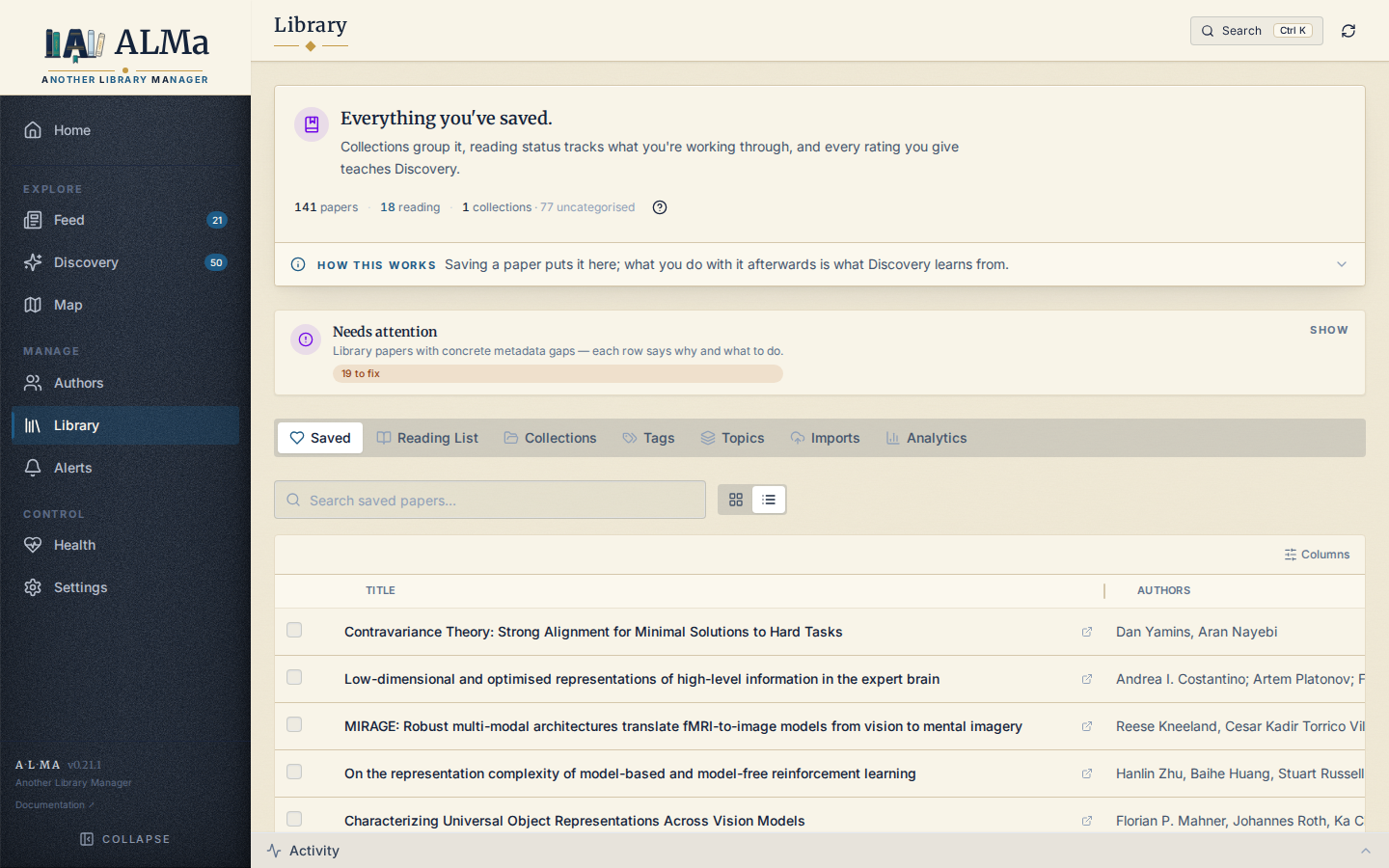
The Library page is action-oriented: it surfaces what you need to do next (read, triage, organise), not analytics about the collection. Analytics live on the Analytics tab (and per-collection analytics at the bottom of the Collections tab); the full tracked-paper table lives in the Corpus Explorer (Settings → Data & system).
Tabs
| Tab | Contents |
|---|---|
| Saved | Every paper with status='library'. The default landing. |
| Reading list | Papers currently being read, plus done / excluded history. Independent of saving. |
| Collections | User-defined named groupings of saved papers. |
| Tags | User-defined keyword chips, attached to saved papers (max 5 per paper). |
| Topics | OpenAlex / source-backed scholarly topics, normalised and aliased. |
| Imports | Staging panel for unresolved BibTeX / Zotero imports. |
Landing cards
Above the tabs, the landing surfaces three primary workflow cards:
- Library Papers — total saved count.
- Currently Reading —
reading_status='reading'count. - Collections — total collections count, with a quick-link to the Collections tab.
Below those cards, the page also surfaces a Reading workflow summary and a Needs Attention list for saved papers with concrete metadata gaps or lifecycle work left to do.
Save / rate / read
The three first-class operations on a Library paper:
- Rating — set via the star control or the rating verbs (Save / Like / Love / Dislike). See Paper lifecycle.
- Reading status —
reading / done / excluded, set via the reading select on the row. Independent of rating. - Notes — a free-text field, saved via
PUT /library/saved/{id}.
Collections
Collections are user-defined named buckets — for example "Thesis chapter 2", "Methods I want to try", "Papers to share with X". They are first-class: a paper can be in many collections, and a Collection has its own colour, description, and recency / size health metrics on the Collections tab.
Collections only contain saved papers. You can't add a Feed candidate or a Discovery suggestion to a collection — save it first, then organise.
Tags
Tags are short keyword chips. Cap of 5 per paper. They are intended to be lightweight: "review", "method", "data", "to-cite". Discovery boosts recommendation scores 2× when a candidate's topics match a tag you've used.
The Tags tab also surfaces:
- Tag merge suggestions — when two tags are textually similar
(
specandspecs), ALMa proposes merging them. - Suggested tags — per-paper proposals derived from embeddings, topics, and text signals, depending on what is available.
Topics
Topics differ from tags: they're source-backed. ALMa pulls topics from OpenAlex (and SOLR-style aliases) and tracks them per paper. The Topics tab lets you:
- See topic coverage across the Library.
- Group / rename topics into your preferred vocabulary.
- Define aliases so different upstream labels collapse to one.
Imports
Importing a Zotero or BibTeX file is treated as an explicit save
intent — imported papers land directly in the Library
(status='library', added_from='import'). They do not stage as
candidates.
The Imports tab shows two things:
- The Import Papers dialog launcher (BibTeX / Zotero JSON / Zotero RDF / Online search).
- Unresolved imports — rows that landed in the Library but couldn't be matched to an OpenAlex work (low-confidence title-only matches, missing DOI, ambiguous author). Use Resolve OpenAlex to retry resolution and Enrich Metadata to fill in topics / citations on resolved rows.
See Importing for the workflow.
Bulk operations
The Saved tab supports row selection for bulk actions:
- Add to collection — adds N papers to a collection at once.
- Remove from Library — soft transitions to
status='removed'. - Clear rating — sets rating to 0 (paper stays saved).
Read endpoints
GET    /api/v1/library/saved              # list saved papers
POST   /api/v1/library/saved              # save a paper
PUT    /api/v1/library/saved/{id}         # update notes / rating
DELETE /api/v1/library/saved/{id}         # remove (soft)

GET    /api/v1/library/reading-queue
GET    /api/v1/library/workflow-summary

POST   /api/v1/library/bulk/clear-rating
POST   /api/v1/library/bulk/remove
POST   /api/v1/library/bulk/add-to-collection
Plus collections (/library/collections), tags (/library/tags),
topics (/library/topics), and imports (/library/import/*). See
REST API for the full list.